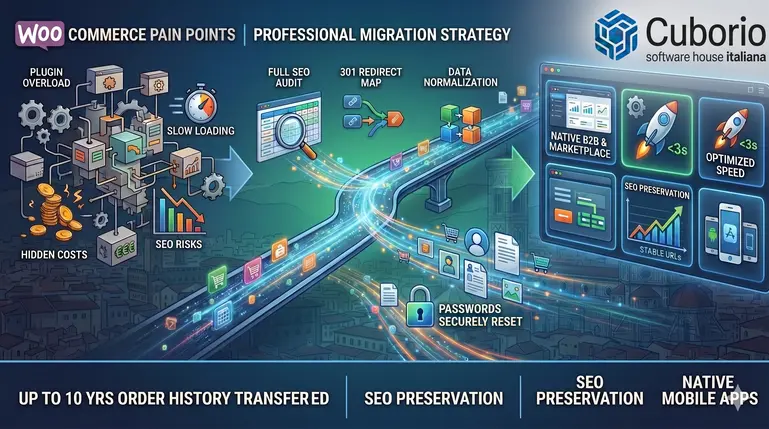
What are the real SEO risks when migrating from WooCommerce?
The main risk of an e-commerce migration is the loss of organic rankings. Google indexes URLs, not abstract content. If URLs change during the migration without proper 301 redirect mapping, the search engine interprets the new pages as duplicate or replaced content, and rankings plummet.
According to SEMrush data for 2024, 63% of poorly planned e-commerce migrations see a drop in organic traffic of over 30% in the first three months. Of these, 41% never fully recover their previous rankings. The most common cause is the absence of a systematic redirect strategy.
The most common SEO mistakes during migration
The first mistake is changing the URL structure unnecessarily. If, on WooCommerce, product URLs follow the pattern /product/product-name/, changing this to /shop/product-name/ or /category/product-name/ means losing the authority accumulated by those pages. Google Search Console confirms that any URL change without a 301 redirect results in a temporary drop in rankings, with recovery times ranging from 2 to 6 months.
The second mistake concerns meta tags and titles. Many destination platforms automatically generate titles and meta descriptions using logic that differs from WooCommerce’s. If, during migration, these elements are automatically generated by the system, Google interprets the change as an editorial modification and may temporarily downgrade the pages. It is essential to manually map the meta tags before migration and verify that they have been approved exactly as they were.
The third mistake is ignoring images and their alt text. Google Image Search accounts for an average of 12–18% of organic traffic for a generalist e-commerce site, a figure that rises to 30% for sectors such as fashion, furniture and design. If, during migration, the alt text for product images is lost or replaced with generic strings, visibility is lost in a key acquisition channel.
A case documented by Moz in 2023 concerns an Italian clothing e-commerce site that migrated from WooCommerce to Shopify without mapping the image alt text: traffic from Google Images fell by 54% and never fully recovered.
How to preserve SEO rankings during a migration from WooCommerce
The key to migrating from WooCommerce without losing rankings is planning. Before starting any technical work, a comprehensive SEO audit is required to identify all indexed pages, URLs generating organic traffic, ranked keywords and backlink sources.
Preliminary audit: identifying what to transfer
The first step is to extract from Google Search Console the complete list of pages that have received impressions and clicks over the last 12 months. Not all pages on the site need to be migrated: many obsolete pages, empty categories or duplicate URLs can be removed without any negative impact. The aim is to focus on URLs that generate value: products for sale, main categories, blog posts with organic traffic, and landing pages optimised for strategic keywords.
The second step is to check the backlinks. Tools such as Ahrefs or Majestic allow you to identify which URLs on your WooCommerce site receive inbound links from other sites. Each backlink represents a vote of confidence for Google: if the target URL changes without a redirect, that vote is lost. Backlink mapping ensures that every external link continues to work after the migration.
A useful tool at this stage is 404 error management, which is essential for monitoring any broken links during and after the migration.
Creating the 301 redirect map
The redirect map is a file that associates each old WooCommerce URL with the new URL on the destination platform. The most common format is a CSV file with two columns: OLD_URL and NEW_URL. This file is then imported into the new platform’s redirect management system.
It is essential that redirects are permanent 301 redirects, not temporary 302 redirects. Google treats 301 redirects as an explicit signal that the page has moved permanently, transferring up to 90–99% of SEO authority to the new URL. 302 redirects, on the other hand, indicate a temporary move and do not transfer authority.
Cuborio handles 301 redirects natively via its integrated CMS, without the need for plugins or complex servers. Each redirect is automatically tested after implementation to verify that it returns a 301 status code and does not generate multiple redirect chains.
How long does it take to migrate from WooCommerce to a new platform?
The duration of a migration depends on the complexity of the e-commerce site. For a catalogue of fewer than 500 products, without complex external integrations, a well-planned migration takes between 4 and 6 weeks. This timeframe includes preliminary analysis, development, testing, data migration and post-launch SEO checks.
For catalogues with over 2,000 products, involving ERP integrations, external marketplaces or custom payment systems, the timeframe increases to 8–12 weeks. The main variable is not the number of products per se, but the quality of the existing data. If, on WooCommerce, product pages contain custom fields created with different plugins, duplicate categories or non-standardised attributes, preliminary data cleaning and normalisation is required, which can take weeks.
The operational phases of the migration
The first phase is data preparation. This includes exporting products, categories, customers, order history, reviews and SEO metadata. WooCommerce allows exporting via plugins such as WP All Export, but the data format almost always requires transformation to be compatible with the target platform.
The second phase is the development and customisation of the new platform. Even if the migration is to a turnkey solution, customisation work is always required to replicate specific functionalities: complex discount rules, automatic calculation of shipping costs by geographical area, and integration with couriers or warehouse management systems.
The third phase is testing in a staging environment. Before going live, the new platform is populated with live data and tested in a non-public environment. Purchase funnels, payment gateways, transactional emails, VAT calculation for B2B and B2C customers, and coupon and promotion management are all verified. This phase is critical: a bug discovered after launch can compromise sales for days.
The fourth phase is the final migration and go-live. The migration should be scheduled for a period of low traffic: typically at weekends or during night-time hours. During the go-live, 301 redirects are implemented, all systems are checked to ensure they are operational, and Google Search Console is monitored to detect any 404 errors or indexing issues.
Is it possible to retain all the original URLs during the migration?
Yes, it is technically possible to retain the same WooCommerce URL structure on the new platform, provided the destination system supports custom URLs without strict constraints. Many SaaS platforms impose a predefined URL structure (/products/, /collections/), making it impossible to replicate the existing structure exactly.
Cuborio, being a proprietary platform developed in-house, allows you to configure any URL structure without limitations. If products on WooCommerce follow the /category/subcategory/product/ scheme, you can maintain exactly the same hierarchy on Cuborio. This completely eliminates the SEO risk associated with changing URLs.
However, in some cases it is worth taking advantage of the migration to optimise the URL structure. If URLs on WooCommerce contain unnecessary parameters, stop words or overly long paths, the migration is an opportunity to simplify them. In this scenario, implementing 301 redirects from old to new URLs is required, but the long-term SEO benefit outweighs the initial effort.
A concrete example: a B2B e-commerce site for industrial furniture had URLs on WooCommerce such as /shop/product-category/subcategory/product-brand-code/. During the migration to Cuborio, this was simplified to /products/brand-model/, resulting in more readable URLs and a 22% reduction in average length, with a positive impact on CTR in search results.